


Description
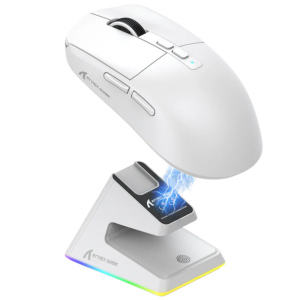
Attack Shark X6 Tri-Mode Gaming Mouse with Charging Dock w/ Tape Edition
Product Description:
Specifications:
- Connectivity: Wireless, Bluetooth, and Wired USB
- Sensor Quality: High-precision optical sensor
- DPI Settings: Adjustable up to 16000 DPI
- Buttons: 6 programmable buttons
- Ergonomics: Ergonomic design suitable for all grip styles
- Weight Adjustment: Customizable weight system
- RGB Lighting: Customizable RGB backlighting
- Build Quality: Durable build with high-grade materials
- Software: Intuitive software for customization
- Origin: Imported
Our Rating for this Product:
⭐⭐⭐⭐☆
Performance and Features :
The Attack Shark X6 Gaming Mouse is engineered for precision and adaptability, making it a superb choice for gamers across all skill levels. It offers a trio of connectivity options—wireless, Bluetooth, and wired—ensuring compatibility and convenience for any setup. The high-precision optical sensor, coupled with up to 16000 adjustable DPI, provides exceptional tracking accuracy. Its ergonomic design is meticulously crafted to accommodate palm, claw, and fingertip grip styles, ensuring comfort and control during extended gaming sessions. With customizable weights, programmable buttons, and dynamic RGB lighting, the Attack Shark X6 is a versatile tool designed to enhance every gaming experience.
Highlighted Features:
- Flexible Connectivity: Select between wireless, Bluetooth, or wired connections.
- Ultra-Precise Sensor: Achieve flawless accuracy with the adjustable high-DPI sensor.
- Tailored Comfort: Ergonomically designed to support palm, claw, and fingertip grips.
- Personalized Setup: Customize weight, program buttons, and adjust RGB lighting.
- Powerful Customization Software: User-friendly software for comprehensive customization.
How to Use:
- Connect the mouse via your chosen method: wireless, Bluetooth, or USB.
- Install the software from the manufacturer to customize DPI, lighting, and controls.
- Adjust the mouse’s weight to your liking using the included adjustable weights.
- Program the buttons for your favorite in-game actions or macros.
- Set up the RGB lighting to sync with your gaming environment or mood.
Beginners’ Guide to Gaming with Attack Shark X6:
At RockatShip, we are passionate about gaming, and we want to empower new gamers with the right tools. Understanding grip styles is crucial for maximizing your gaming mouse’s potential. The Attack Shark X6’s ergonomic design supports all grip styles—whether you prefer palm, claw, or fingertip grips, this mouse ensures you maintain optimal comfort and control. Learn more about grip styles here: What is Grip Style?
For FPS gamers, the right DPI setting can make all the difference. Discover how to adjust your Attack Shark X6 for perfect aiming precision: Get the Perfect Mouse Aim!
Elevate your game with the Attack Shark X6, the ultimate gaming mouse designed for every player, every game, every victory.
Explore Our Full Range of Gaming Mice Here!
Dive into our extensive collection of high-performance gaming mice designed to enhance your gaming experience. Whether you’re a casual gamer or a professional, you’ll find the perfect fit to level up your gameplay. Click here to discover more in our Gaming Mouse category!
ATTACK SHARK X6 Manuals
ATTACK SHARK X6 Software
https://www.youtube.com/watch?v=8CInMat9wXQ


Product Parameters:
Model: X6
Connection: Wired/2.4G/BT5.2
Size: 118.3x62x37.3mm
DPI: 800-26000dpi
Weight: 55g±3g
Return Rate:125-1000Hz
Image Sensors: PixArt PAW3395
HUANO Switch: Pink Spots 80 million times
Working Life: 65H
Accelerated Speed: 50G
Movement Speed :650IPS
Colour: Black/White
Supported operating systems: XP, Win7, Win8, Win10, Mac, Android, etc.
Integrated full-function base
Magnetic fast charging, streaming light ring
Magnetic charging base with exclusive RGB light ring, support multiple light effects switching with one key.
Lighting effect switching by touch ,Multiple light effects switching in seconds
Packing list
1. Mouse
2. 2.4G Receiver3.Manual4. Charging Cord Type-C 5.Charging base6.Anti-slip stickers Macro Drivers
One app for total control. dpi adjustments, payback rates,custom macros,A range of configurations such as keystrokes and programming can be set and saved in the driver.X6 mouse driver Link:http://en.freewolfgaming.com.cn/Download.aspx?ClassID=26&page=1After opening the link, click on X6 Mouse Driver (English) to download. Description:If there is a mistake in the weight and battery capacity indicated in the box and manual, the description uploaded in this link shall prevail. It can support MAC drivers and normal use products, but the upper computer software configuration software currently only supports the WIN system
There are no reviews yet.